

What If Your AI Coding Assistant Could Actually See Your Vision?
Here’s a frustrating scenario most of us have lived through: You describe your dream app to an AI coding tool. It builds something. But it’s not what you had in mind. The layout feels generic. The colors are off. Half the features are missing. And now you’re spending just as much time fixing and redirecting as you would’ve spent building it yourself.
Yeah, we’ve all been there. That disconnect between what’s in your head and what the AI actually builds? That’s the problem Design OS was built to fix. I just tried it out and I’m kind of blown away by how well it works.
What Is Design OS?
Design OS is a free, open-source AI product design tool created by Brian Casel over at Builder Methods. Brian calls it “the missing design process between your product idea and your codebase.” That pretty much nails it.
Instead of jumping straight into code and hoping for the best, you work through a guided process that captures what you’re building and why. Then it packages everything your AI coding agent needs to actually build it right the first time.
It works with Claude Code, Cursor, GitHub Copilot, and basically any AI coding tool you’re already using. And the best part? It’s completely free and open source on GitHub.
The Problem It Solves
Look, AI coding tools are amazing at building fast. They can spin up entire applications in minutes. But speed without direction? That just gets you to the wrong destination faster.
When you ask a coding agent to figure out what to build and build it at the same time, design decisions get made on the fly. They’re buried in code. There’s no shared understanding. No spec. No source of truth for what “done” actually looks like.
Design OS fixes this by separating the thinking from the doing. You plan first. Then you build. It sounds obvious when you say it out loud, but almost nobody was doing it this way until now.
How It Works
Product planning with AI doesn’t have to be complicated. Design OS walks you through four steps, and each one is basically a conversation between you and AI. It asks you smart questions, you provide direction, and together you shape a product that actually matches what’s in your head.
Step 1: Product Planning
You start by running /product-vision. The AI asks you what you’re building, what problems it solves, who it’s for. By the end of that conversation, you’ve got a product overview, a roadmap, and a data model all written out. Feels like magic, but it’s really just good questions asked in the right order.
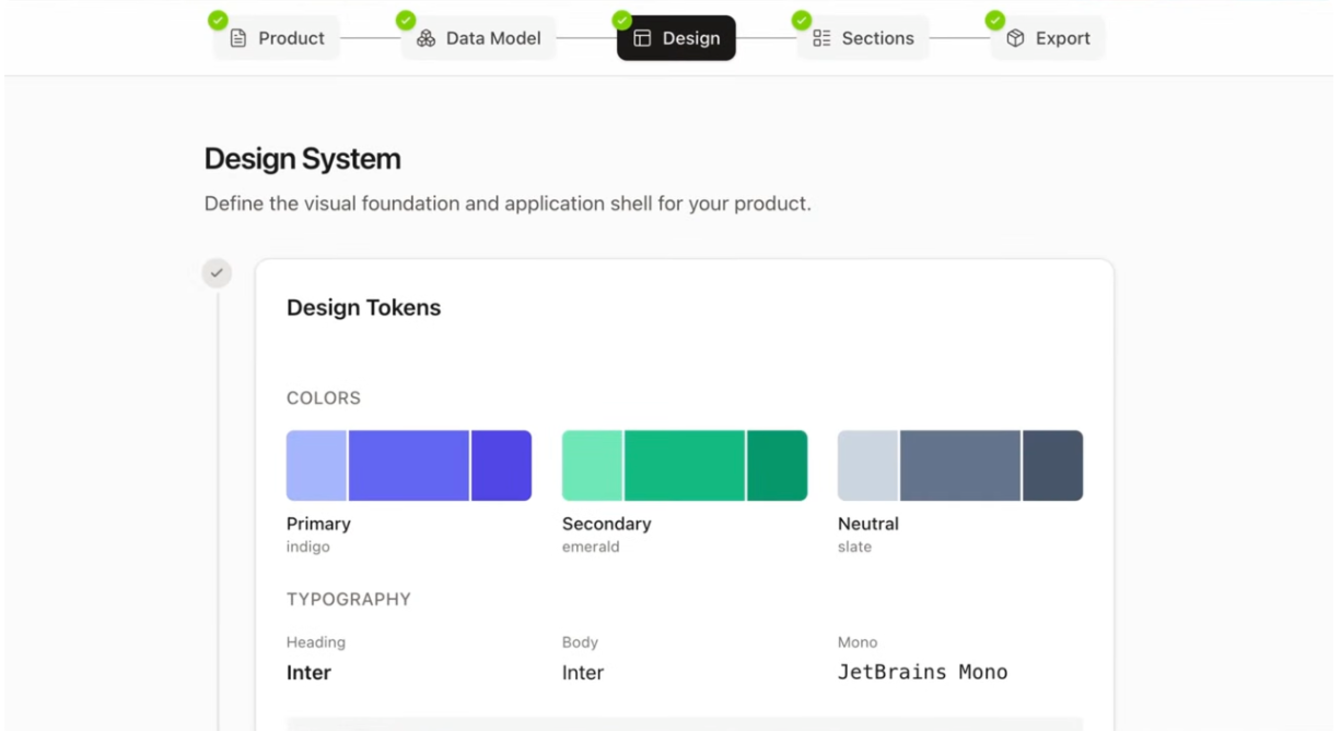
Step 2: Design System
Next, you pick your colors (from Tailwind’s palette) and typography (from Google Fonts). This becomes the visual foundation for everything. Run /design-tokens and you’re choosing the look and feel of your product before a single component gets built.
Step 3: Section Design
This is where it gets fun. For each feature area of your product, you define requirements, generate sample data, and design the screens right inside the tool. You end up with actual screen designs that look like your product, not some generic placeholder UI.
Step 4: Export
Here’s the kicker: when you’re done designing, you run /export-product and Design OS spits out a complete handoff package. Production-ready React components. TypeScript interfaces. Implementation instructions. Even pre-written prompts you can paste directly into your coding agent. It’s basically a design handoff for AI, telling your coding assistant exactly what to build, screen by screen.
Getting Started Takes About Two Minutes (And You Don’t Even Have to Do It Yourself)
OK so here’s the part that really got me. The installation page for Design OS has a bunch of terminal commands. Git clone this, npm install that. If you’re not a developer, that kind of stuff can make your eyes glaze over.
But I didn’t type any of it. I just pasted the installation page link into Claude Code and said “help me install this.” Claude read the page, figured out every step, and ran all the commands for me. Cloned the repo, removed the remote, installed the dependencies, started the dev server. I watched it happen in real time. Done.
I have no idea what “git clone” actually does. Couldn’t tell you the difference between npm and Node.js if you quizzed me. Didn’t matter. I gave Claude a URL and it took care of everything. That’s the part that got me. The barrier to entry for tools like this basically disappeared the moment I had an AI agent to handle the technical bits.
For the curious, here’s what the actual setup looks like under the hood:
- Clone the repo:
git clone https://github.com/buildermethods/design-os.git my-project - Clean the remote:
git remote remove origin(so it’s your own fresh copy) - Install dependencies:
npm install - Start the server:
npm run dev - Launch your AI agent and run
/product-visionto begin
But honestly? You can skip reading all that. Just give the link to Claude Code and let it do the work. Your backend can be whatever you want. Design OS only handles the frontend design layer.
Why This Matters So Much
I’ve been building with AI tools for a while now, and the biggest lesson I keep re-learning is that the better your input, the better your output. That’s all Design OS really is: a way to give AI the best possible input before it starts writing code.
Instead of vague prompts and endless back-and-forth corrections, you hand your coding agent a complete blueprint. Colors, typography, component structure, data shapes, screen-by-screen specs. The AI stops guessing and just builds what you designed.
And this isn’t only for developers. If you’re a founder with a product idea, you can use Design OS to plan out the whole thing without writing a line of code yourself. The conversational workflow meets you wherever your skill level is.
The Bigger Picture: The Builder Methods Philosophy
Design OS didn’t come out of nowhere. It’s part of something bigger Brian Casel has been building at Builder Methods. His whole approach is that AI isn’t just a faster version of the old tools. It changes how you should think about the work itself.
Brian also created Agent OS, which gives coding standards for AI-powered development. Pair that with Design OS and you’ve got a full loop: plan your product, design it, then hand it off to AI to build. Pretty slick.
Builder Methods offers a Pro membership if you want deeper training, live workshops, and community support. But the core tools are free and open source, which is exactly the kind of thing we love to see here at Creative AI Mag.
Who Is This For?
If you’re a developer who’s tired of re-doing what AI got wrong, this is for you. If you’re a founder with a product idea but no design background, this walks you through the whole thing. Designers will appreciate having actual control over the output instead of hoping the AI picks decent colors. And if you’re freelancing or running an agency, this could seriously speed up how you scope and deliver client work.
Final Thoughts
We’ve been asking AI to read our minds when we should’ve been giving it a blueprint. That’s the core insight here, and Brian Casel built the tool to match.
Four steps. Plan, design, section, export. You go from a messy idea in your head to a complete package that any AI coding agent can run with. It’s free, open source, and works with Claude Code, Cursor, Copilot, or whatever you’re using.
If you’ve ever looked at what an AI agent built for you and thought “that’s not what I meant” — go try Design OS. It’s the missing piece most of us didn’t know we needed.
Frequently Asked Questions
Is Design OS free?
Yes. It’s completely free and open source. You can clone it from GitHub and start using it right away.
What AI coding tools does Design OS work with?
Claude Code, Cursor, GitHub Copilot, Codex, Gemini, and pretty much any AI coding agent. It’s not locked to one tool.
Do I need to know how to code to use Design OS?
No. The whole process is conversational. And if the installation steps look intimidating, you can have Claude Code handle the setup for you by just giving it the install page link.
What tech stack does it require?
You need Node.js (v18+) to run it locally. Your target codebase should use React and Tailwind CSS v4. Your backend can be anything.
Want more AI tools like this? Follow along at CreativeAIMag.com for the latest!
